
URL Format
The Single Account page gives you details about a wallet address
The general format for the URL is https://taostats.io/account/<wallet> address. See an example wallet.
Summary
The top of the page has a wallet summary:

- Balance: Both in tao and USD. The arrow indicates the % change in the last 24 hours.
- Delegated: Bar chart breaking down the distribution of tao.
- Staked to root
- Staked in alpha
- Free tao
- Liquidity Positions: amount in liqudity positions
- Reserved: Tao placed in reserve (generally when a proxy is added)
- 24h balance change: In tao and USD.
- Wallet Creation Date: Date the wallet was created
- Address: coldkey and public key
Alpha Balances
This table shows all alpha stakes with initial sort on % of stake
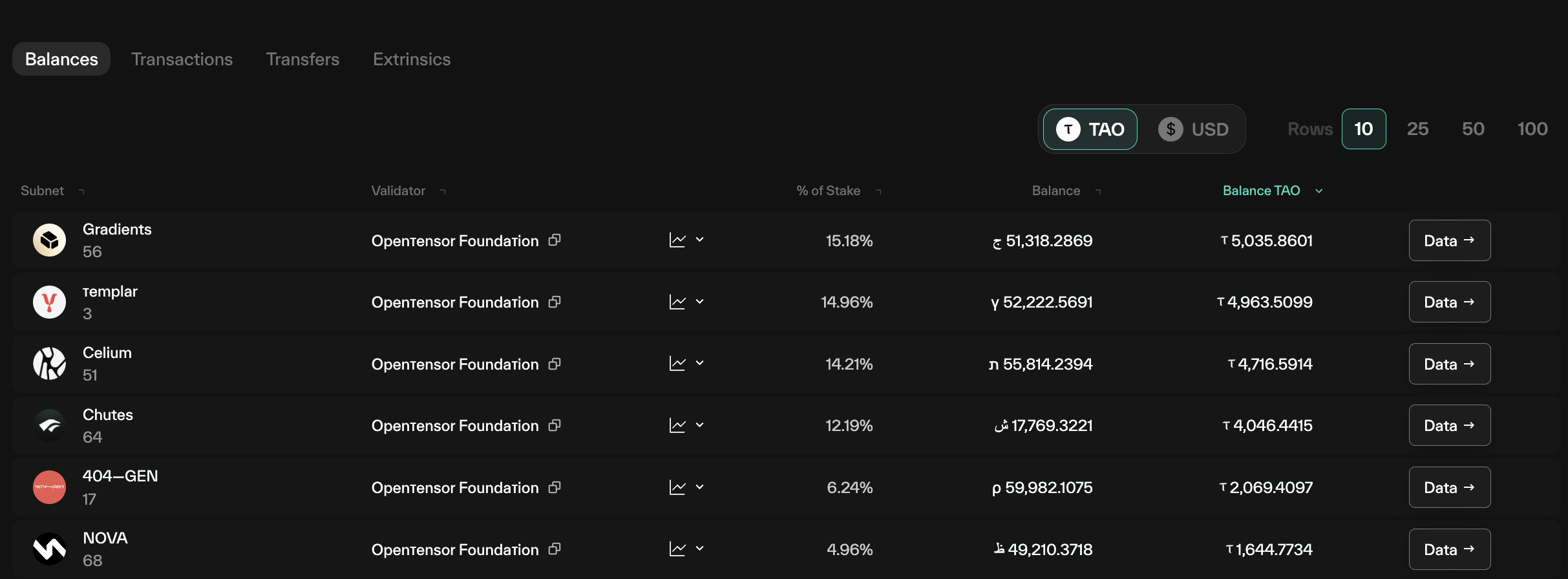
- Subnet: The subnet with stake
- Validator: Validator that is staked to
- Chart: Dropdown opens a chart (see Alpha chart )
- % of stake: Percentage of stake (converted to tao)
- Balance: Alpha balance
- Balance Tao: Alpha balance converted to tao.
- Data
Alpha chart
For each stake held, there is a chart with a carat. Clicking opens a drawer in the table.
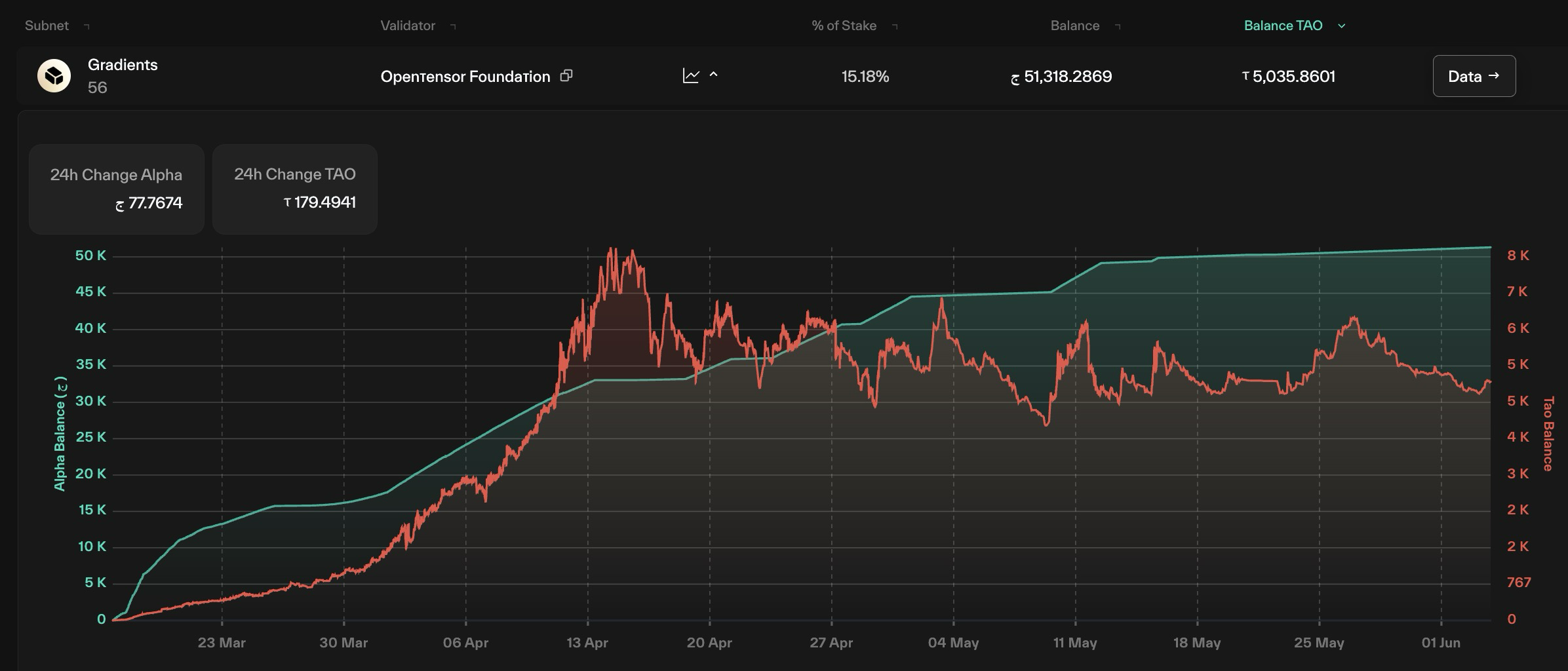
- 24 hour change in alpha and tao
- Chart of historical stake - showing both value in tao (red) and value in alpha (teal)
Alpha Staking Transactions
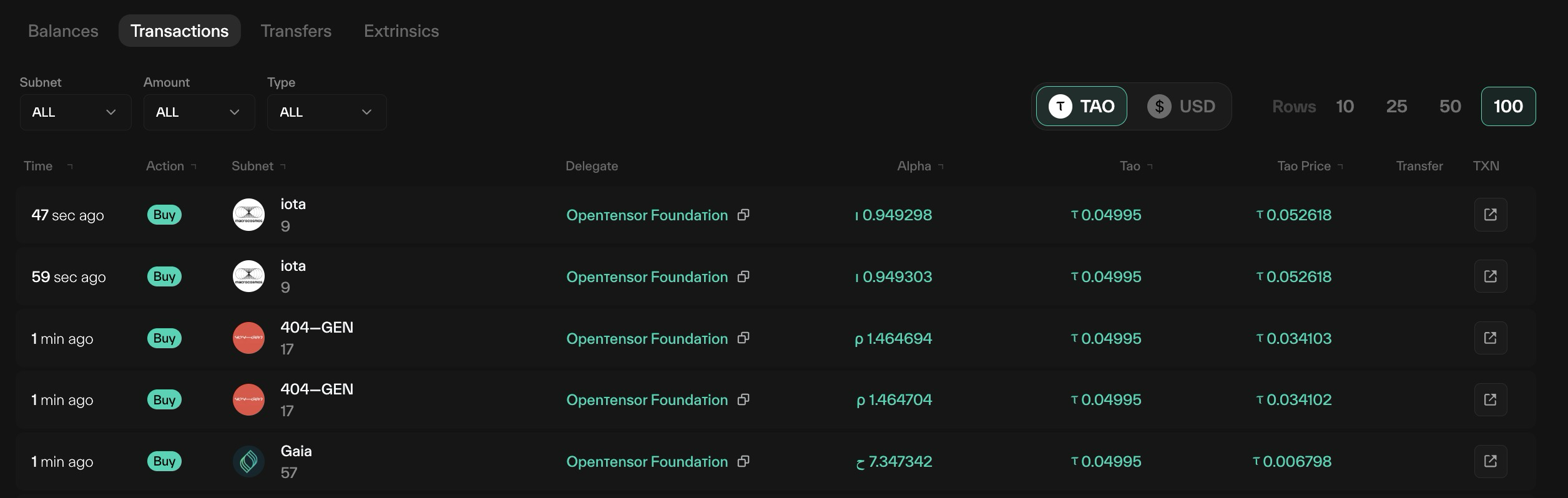
This table can be sorted by Subnet, Type, and Amount
- Time: when the transaction took place (mouseover for exact time in GMT)
- Action: Buy, Sell, Transfer In, Transfer Out.
- Buy and sell are transfers of tao and alpha
- Transfer in/out are changes in validator or Subnet of alpha.
- Subnet: The alpha purchased/sold
- Delegate: The validator staked to.
- Alpha: The amount in alpha
- Tao: the amount in tao.
- Tao Price the price of the alpha (in Tao) at the time of transaction.
- TXN a link to the Extrinsic of the transaction.
Transfers: Tao Transactions
This table lists all transactions of tao in and out of the wallet

- Arrow: Green indicates "tao coming in", red indicates "tao going out"
- Extrinsic: the chain extrinsic for the transaction. Clicking opens the extrinsic
- From: Coldkey sending tao
- To: Coldkey receiving tao
- Amount: tao sent
- Time: When the transaction occurred. Mouseover for GMT date/time
Extrinsics
This table lists the account's on-chain extrinsics — the signed calls this coldkey has submitted.
- Extrinsic: the extrinsic ID; clicking opens its detail page.
- Block: the block the extrinsic was included in.
- Call: the pallet and method called (e.g.
Balances.transfer,SubtensorModule.add_stake). - Time: when it was submitted (mouseover for exact GMT).
Proxies
The Proxies tab lists every proxy set on the account, and the type of each.
- Delegate: the account authorised to act on this coldkey's behalf.
- Type: the proxy type, which scopes what the delegate may do (e.g.
Any,Staking,Transfer,Governance). - Delay: the announcement delay (in blocks) before a proxied call can execute, if set.
Claims
The Claims tab lists the account's most recent root claims — the manual claim_root calls that realise root staking rewards under Root Reborn.
- Time: when the claim was made.
- Amount: the TAO realised by the claim.
- Extrinsic: link to the
claim_rootextrinsic.
Conviction
The Conviction tab shows the conviction this account has placed, per subnet.
- Subnet: the subnet the conviction is locked on.
- Conviction: the current conviction weight.
- Locked: the alpha locked and, where applicable, the unlock schedule.
Updated about 1 month ago